![GBF-Logo.png]](https://support.greatbooks.org/hs-fs/hubfs/GBF-Logo.png?height=50&name=GBF-Logo.png)
If you are adding additional books after you have already registered, please follow these steps:
- Log in to your account.
- In the top right-hand corner, click the small profile button.
- Select Manage Account.
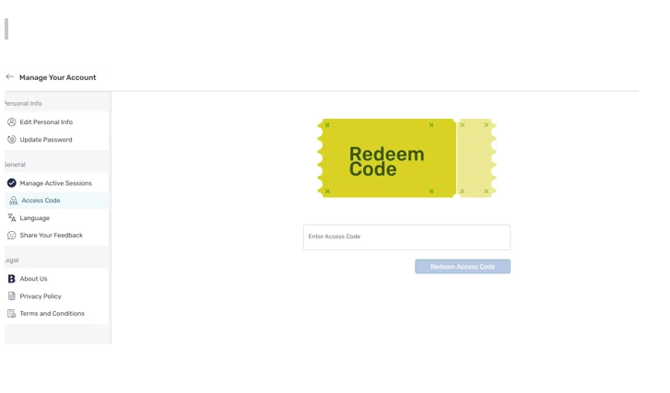
- On the left-hand side, click Access Code.
- You will then see a screen like the one shown below.
- Enter the access code for the new book.
Important reminder:
Access codes are very sensitive. If you copy and paste the code, please be careful not to include any extra spaces, as this may cause the code to appear invalid. Also if you still are getting an invalid code, please use Incognito mode as there may be something in your history that is being picked up. (Incognito means private browsing mode.) You could also clear your history.
In Chrome, you can open it by clicking the three dots in the top-right corner and selecting New Incognito window. Enjoy your books